
OminiKontext - Universal Two-Image Fusion Framework for Flux Kontext

Introduction
OminiKontext is a training framework that teaches Flux.1-Kontext-dev how to intelligently combine two input images. Unlike traditional approaches that alter model architecture, OminiKontext leverages 3D RoPE embeddings to achieve precise reference-based image fusion with any type of content.
The framework enables users to train custom LoRA models that can seamlessly blend reference objects, products, characters, or clothing into target scenes. Whether you're working with e-commerce products, virtual try-on applications, or creative content generation, OminiKontext provides the tools to teach Kontext exactly how to merge your specific use case.
Quick Links
🚀 Live Demo Available on Replicate
🛠️ ComfyUI Integration & Workflows
Key Features & Capabilities
How Flux.1-Kontext Differs from Standard Flux.1-Dev
The key innovation in Flux.1-Kontext lies in its 3D RoPE embedding system, which fundamentally changes how images are processed compared to standard Flux.1-dev:
Standard Flux.1-dev: Uses 2D RoPE embeddings where image tokens are arranged in a simple 2D grid (width × height).
Flux.1-Kontext: Introduces a third dimension creating layered token spaces (width × height × layers), similar to Photoshop's layer system. This allows multiple images to exist in separate layers that can be precisely controlled and blended.
The Delta Coordinate System
OminiKontext leverages this 3D architecture through its delta coordinate system that provides unprecedented control:
delta = [L, Y, X]
Where:
- L (Layer): Which layer the reference image occupies relative to the base
- Y, X (Position): Top-left positioning within that layer (in token coordinates)
- Token Conversion:
delta = [L, Yp // 16, Xp // 16]where Yp, Xp are pixel coordinates
Key Mechanism:
- Base image is always placed at layer 1 starting from
[1, 0, 0] - Reference images can be positioned at
[L+1, Y, X]for layer separation - Each token represents a 16×16 pixel patch for efficient processing
Spatial vs Non-Spatial Control Modes
Spatial Control (delta = [1, Y, X]):
- Places reference on a different layer than the base
- Enables pixel-perfect positioning for products, clothing, or objects
- Ideal for e-commerce photography and VTON applications
- Example:
delta = [1, 0, (base_width - subject_width) // 16]for right-edge placement
Non-Spatial Control (delta = [0, 0, 96]):
- Places reference in the same layer with large offset
- Model learns contextual blending without strict positioning
- Perfect for natural integration where exact placement isn't critical
- Commonly used for character insertion and creative applications
Advantages Over Traditional Image Stitching
Traditional approaches stitch images horizontally or vertically, which:
- Ties subject position to base image dimensions
- Creates inconsistent training data
- Offers no precise XY control
OminiKontext's delta system:
- Consistent Training: Fixed deltas ensure stable learning across examples
- Precise Control: Token-level positioning accuracy
- Efficiency: Avoids tokenizing empty white space through optimized cropping
- Flexibility: Switch between spatial and contextual blending modes
Live Examples
Multi-Domain Integration Results
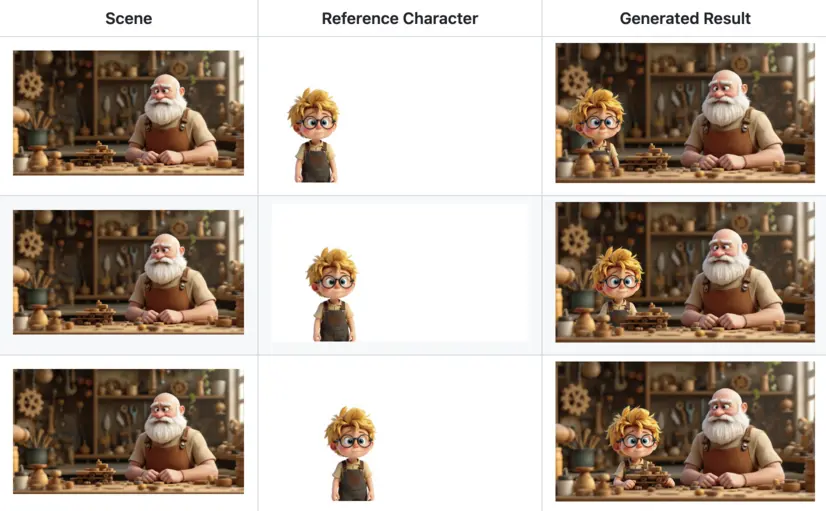
OminiKontext demonstrates versatile capability across different domains:
- Product Placement: Seamlessly inserting products into lifestyle and commercial settings
- Virtual Try-On: Natural clothing and accessory integration on models
- Object Insertion: Precise placement of any object into target scenes
- Character Integration: Cartoon and realistic character placement
Model Performance Comparison
When compared to vanilla FLUX.1-Kontext-dev, OminiKontext shows significant improvements in:
- Object integration quality across all domains
- Spatial positioning accuracy and control
- Scene coherence and natural blending
- Reference image fidelity preservation
- Training efficiency for custom use cases
Example Pretrained Models
OminiKontext comes with several example models showcasing different training approaches. These serve as both functional tools and training references for your custom models:
General Object Models
- character_3000.safetensors: Character and object insertion with white backgrounds
- Delta:
[0,0,96] - Use case: Characters, mascots, simple objects
- Settings: CFG=1.5, LoRA strength=0.5-0.7
- Delta:
Spatial Control Models
- spatial-character-test.safetensors: Precise spatial positioning system
- Delta:
[1,0,0] - Use case: Exact placement control for any object type
- Supports same-size reference images with corresponding placement
- Delta:
Product Integration Models
- product_2000.safetensors: E-commerce and product placement
- Delta:
[0,0,96] - Use case: Product photography, lifestyle integration, VTON accessories
- Ideal for commercial and marketing applications
- Delta:
Note: These models demonstrate the framework's versatility. You can train similar models for clothing (VTON), furniture, vehicles, or any object category using the same methodology.
Getting Started
Refer to the installation guide for detailed instructions on how to get started.