
Workflow screenshot
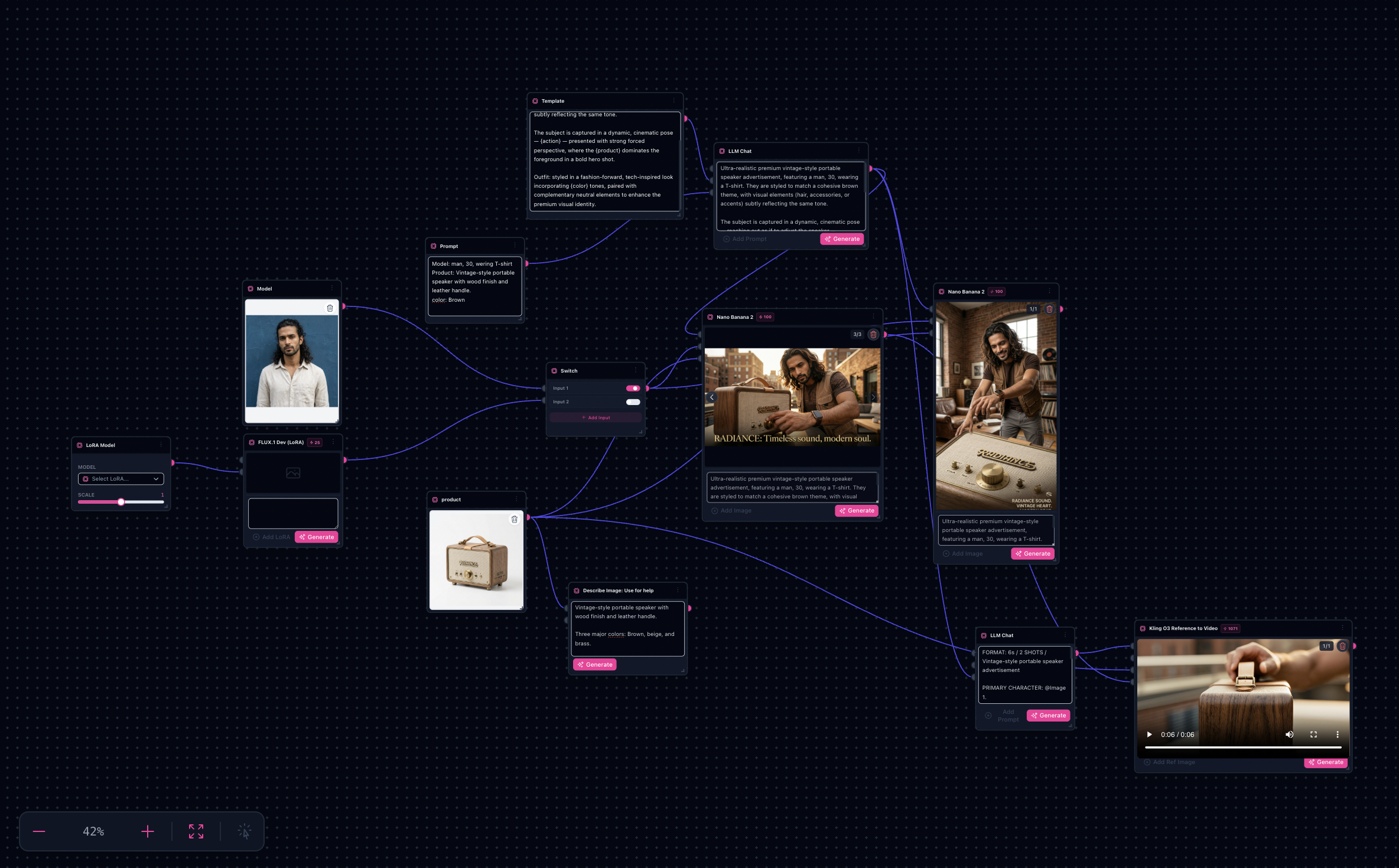
Workflow README
This workflow chains image models, optional LoRA, and video steps so you can stress-test hooks and layouts while keeping the same graph.
- Start from populated nodes—swap product images and prompts only.
- Duplicate branches to generate A/B variations for headlines and backgrounds.
- Export frames or stitch into video nodes when you are ready to ship.
Proof in minutes
Before / after + sample outputs
Every workflow ships with nodes already linked—your job is to drop real inputs and iterate.


Motion sample
Output gallery
3-step path
Value inside five minutes
1
Pick the ad workflow
Open the template and skim the README notes baked into node labels.
2
Swap inputs
Replace product shots, palette references, and voiceover scripts where indicated.
3
Generate + iterate
Run sinks for batches, lock nodes you like, then fork tabs for new angles.
Safe first edits
What you can change first
Style referencesProduct image inputsScene promptsAspect ratiosVideo motion presets
Ship faster
Start from a workflow template
Customize nodes only when you need to. Duplicate this graph for the next campaign instead of staring at an empty canvas.