
Workflow screenshot
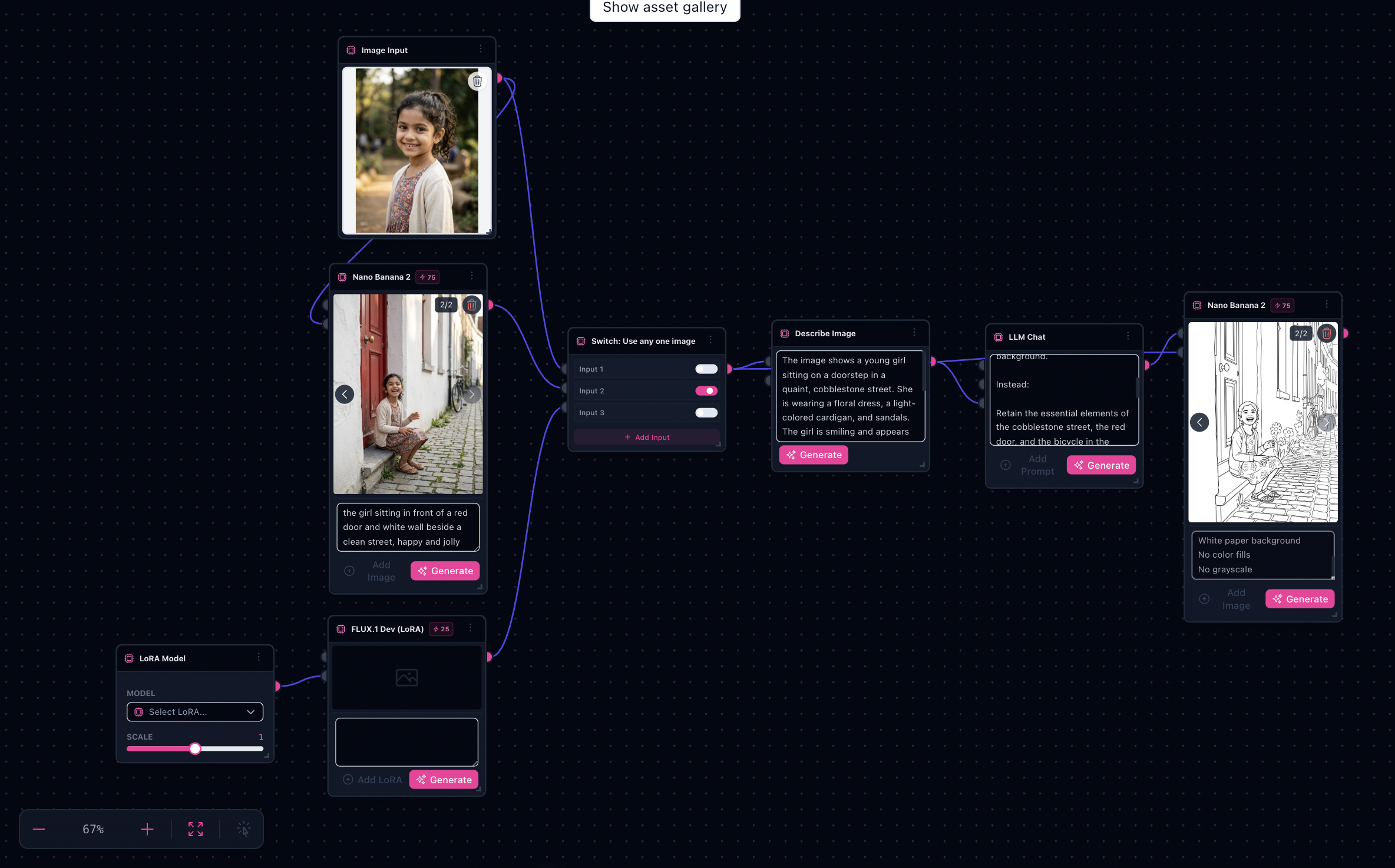
Workflow README
Mirrors the AI Product Ad wiring—source image, LLM describe, template + notes, then image-to-image—tuned for coloring-book output.
- Describe Image node captures subject identity before the prompt pass.
- Editable “Coloring spec” and notes nodes bake in your house style rules.
- Nano Banana sinks let you audition outline variants before exporting.
Proof in minutes
Sample outputs
Original photo, color reference, and Nano Banana sink variants from the bundled graph—full frame with letterboxing.



3-step path
Value inside five minutes
1
Drop a source photo
Replace the demo plate on the Source photo input—any clear subject works best.
2
Tune the spec
Run Describe subject, paste analysis into Analysis & style notes (or edit the coloring spec blocks).
3
Generate outlines
Run LLM Chat then Nano Banana; pick the best sink frame for printing.
Safe first edits
What you can change first
Source photoDescribe subject promptColoring spec textAnalysis & style notesAspect ratioResolution
Ship faster
Start from a workflow template
Customize nodes only when you need to. Duplicate this graph for the next campaign instead of staring at an empty canvas.