
Vibe Coding for Video: How Claude Can Direct an Entire Film

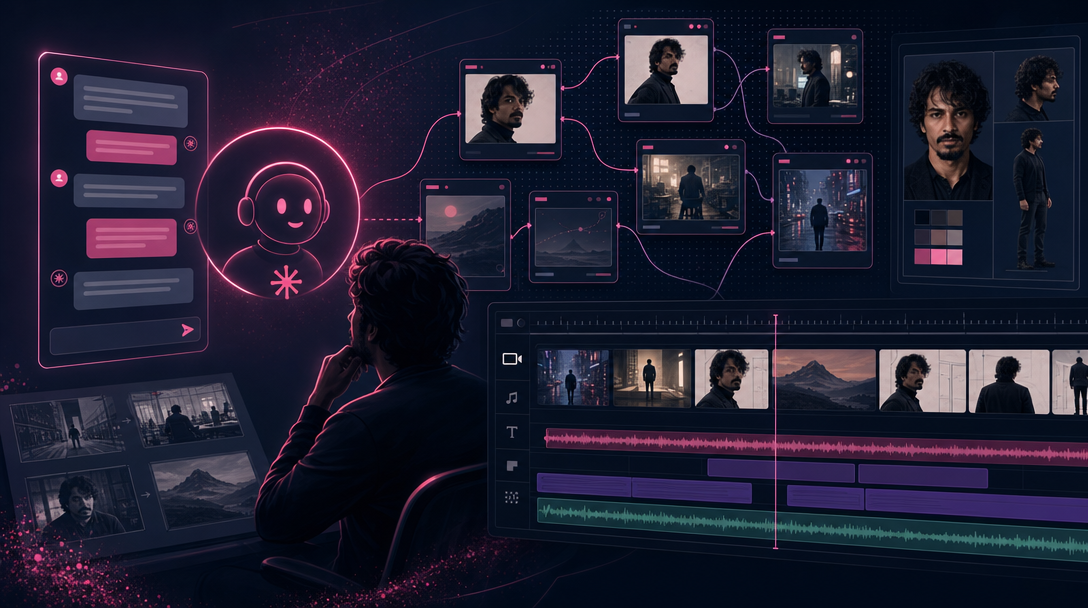
Stylized collage of Flow Studio graph, character sheet, and video timeline for Claude-directed vibe coding for video
You have probably heard of vibe coding—you describe what you want in plain language and an AI agent figures out the implementation. Vibe coding for video works the same way, except the "code" is a film. You talk about mood, story, and intent. Your agent interprets that brief, plans the production, and drives the tools that generate images, clips, and the final edit.
We use Claude in this post, but any capable agent works the same way—Cursor, OpenCode, Claude Code, or similar. Think of the agent less as a chatbot and more as a director who knows your production stack. You bring creative taste; the agent handles the low-level grind—scene breakdowns, prompt wiring, model routing, revision passes. That taste is what keeps your work out of the "AI slop" pile: be specific about scene style, storytelling approach, dialogue delivery, pace, and visual identity (watercolor, ink sketch, cel cartoon)—not whatever the model defaults to.
This post is for beginners. You do not need prompt-engineering tricks or a film school degree. For the big-picture framing, start with What Is Vibe Video?. For hands-on walkthroughs, see How to Create Your First AI Short Film with Claude and TheFluxTrain or the Cursor sibling tutorial. For why this moment feels familiar to developers, read Vibe Directing Is the Next Vibe Coding.
Note: AI video uses credits per generation, and a watchable short usually takes more than one pass. We use Claude as the agent, TheFluxTrain as the production system, GPT Image 2 for storyboard stills, and Seedance 2 for video—but Cursor or OpenCode, CLI-backed studios, and models like Nano Banana or Kling work with the same directing loop.
What you'll need
ChatGPT access: Develop your story and styling narrative before the agent decomposes the shoot—plot beats, mood, visual language, pacing feel.
AI agent: Claude (or Cursor / OpenCode) in a multi-turn thread that can connect to TheFluxTrain skills or CLI.
TheFluxTrain account: Character bibles, Flow Studio pipelines, and the video editor timeline. Characters and flows persist across projects.
Credits and time: Storyboards are cheap; video is not. Budget multiple passes per scene on a first film.
What directing means when Claude is in the loop
Traditional AI video tools ask you to write a prompt, click generate, and hope for the best. That works for a single shot. It falls apart for anything with a story arc, recurring characters, or a consistent visual world.
Vibe coding for video inverts the workflow. You give the agent a creative brief—sometimes a sentence, sometimes a paragraph—and it treats that like a director's treatment. From there, it structures the work:
1. Interpret the brief
Extract genre, tone, pacing, and non-negotiables from what you said—not from generic model habits.
Example: "Two-minute thriller, rainy evening, one woman, inherited Victorian house, envelope that wasn't there yesterday, end on attic door moving" gives the agent a genre, cast size, prop, and final image to aim at.
Use it well: Run a ChatGPT pass first for styling narrative, then hand the agent a brief with feeling and structure.
Mitigates: Empty "make something spooky" prompts that collapse into generic establishing shots.
2. Break it into scenes
Each scene gets one job: establish, escalate, reveal, resolve.
Example: A coffee ad becomes three beats—alarm, commute, café window—each with one emotional job, not three messages crammed into one wide shot.
Use it well: Reject scene lists where one beat tries to "find the letter AND run upstairs AND see the ghost."
Mitigates: Muddy shots and prompts that ask the model to do two story jobs at once.
3. Maintain continuity
Characters, wardrobe, locations, and lighting stay tied to reference assets—not re-described from memory each turn.
Example: Your mini web series barista keeps the same apron color and haircut because her character bible ID is attached to every storyboard panel—not because you mentioned "blue apron" once in turn four.
Use it well: Lock character sheets and location anchors before motion. Update bibles when wardrobe changes.
Mitigates: Face drift, jacket color roulette, and living rooms that rearrange themselves between cuts.
4. Select tools and models
Map each beat to the right machinery—stills before motion, references before text-to-video.
Example: Storyboard Scene 3 with GPT Image 2; animate with Seedance 2 and the locked sheet attached; save the graph as a base flow you clone on the next project.
Use it well: Use deterministic Flow Studio graphs for repeat work; patch per film with the in-browser Flow Studio agent.
Mitigates: One-off mega-prompts that cannot be repeated and model choices that fight continuity.
5. Review generated assets
Compare outputs against the brief and storyboard before assembly—dailies, not premiere.
Example: Beat two returns a leather jacket when the bible says wool coat. The agent flags the mismatch and points to the panel that drifted before you burn credits on nine more shots.
Use it well: Review storyboards as a sequence; review clips in story order, not as isolated files.
Mitigates: Sunk-cost acceptance of bad frames because "we already paid for video."
6. Revise weak shots
Regenerate specific scenes while the rest of the film stays locked.
Example: "Scene 2 too cozy—cooler grade, single lamp, hold on empty chair" updates direction and reruns Scene 2 only; Scenes 1, 3, and 5 untouched.
Use it well: Name what changes narratively and visually—tension, dialogue density, reveal timing—not "make it better."
Mitigates: Full-film regens because one beat failed.
You are not babysitting fifty separate prompts. You are steering one conversation that owns the whole production.
Be careful when directing
- Before you generate: If mood and visual style are fuzzy, stop and sharpen them in ChatGPT. Thin taste in → thin film out.
- At storyboard review: Fix face, costume, and composition before motion. Storyboards are cheap; video is not.

Lock composition and likeness in stills first—cheap fixes here beat expensive video reruns later.
- Mid-project: Changing look without updating the character bible poisons downstream scenes.
- On the agent's first pass: Treat scene lists and prompts as proposals. Push back on tone before pixels.
- On first dailies: Do not accept the first assembly because regeneration costs credits. Weak direction still produces weak video—you fail faster with better metadata.
The workflow forgives revision. It does not forgive missing direction.
Interpreting the brief
A brief can be loose. "A woman discovers a letter in an old house and realizes someone has been watching her." That is enough for the agent to infer thriller cues: constrained spaces, slow reveals, unease in the sound design.
A weak brief is empty of intent. "Make a cool AI video about a house" gives nothing to prioritize. It defaults to generic establishing shots because there is no dramatic question to answer—and lands squarely in the AI slop pile.
A strong brief names feeling and structure:
Two-minute thriller. Rainy evening. One character, mid-30s, alone in a Victorian house she inherited. She finds a sealed envelope that was not there yesterday. End on her looking up at the attic door—something moved. Minimal dialogue. Tense, not jump-scare horror. Visual identity: cool desaturated grade, painterly realism, slow pacing.
You have not written a screenplay. You have given a director enough to break the shoot into setups. When you work inside TheFluxTrain, the agent can attach this brief to a production folder or Flow Studio graph so later turns do not lose context.
Breaking the story into scenes
The agent's next job is scene decomposition—the same work a director does with index cards. Each scene should do one job.
For the house thriller, Claude might propose five beats: rain-soaked exterior (establish isolation), calm interior (normalcy), envelope on the mantel (inciting discovery), reaction to the letter (escalation), attic door with subtle movement (hook). Scenes that try to do two jobs produce muddy shots. The agent splits them because one scene, one beat is how you keep control in AI production.
If you walked through the first short film tutorial, this is the same scene-by-scene logic in conversational form. That tutorial shows the workflow order. Here, the point is why the agent insists on structure before pixels.
Maintaining continuity
The fastest way to make an AI film feel cheap is character drift: different face in every shot, jacket color that changes, a living room that rearranges itself between cuts.
The agent handles continuity by treating characters and sets as assets, not one-off prompts:
- Character sheets — Generated once with GPT Image 2 or your preferred still model, reused every scene.
- Location anchors — An establishing still of the room becomes the reference for all interior shots.
- Prop locks — The envelope, the lamp, the attic door get described once and referenced in downstream prompts.
- Style bible — Color grade, lens feel, and aspect ratio written down so models stay aligned.
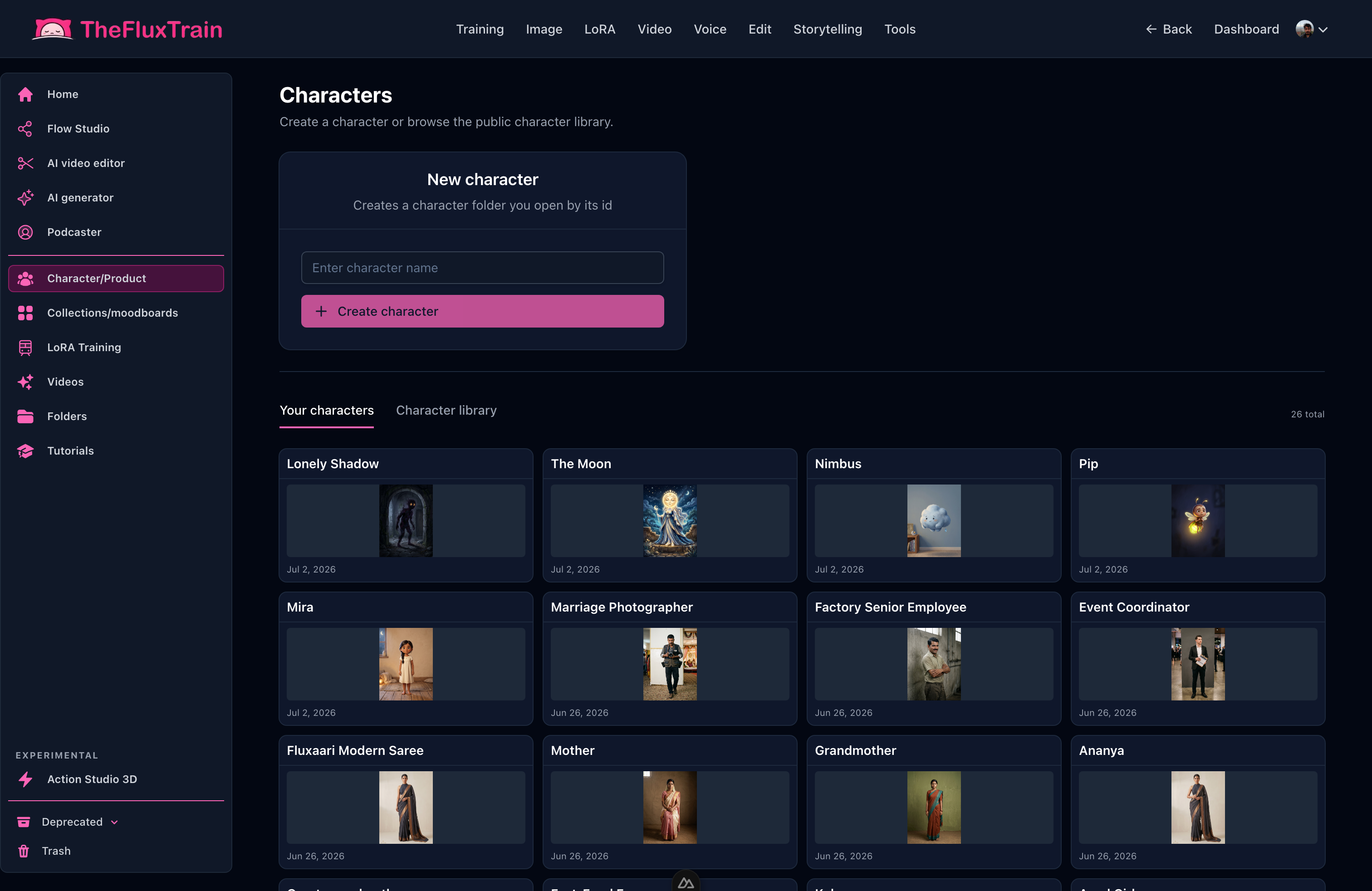
Treat cast and wardrobe as reusable assets—attach the same bible to every panel, not a fresh text description each turn.
When the agent selects tools, it favors image-to-video and reference-driven models (Seedance 2, Kling, etc.) for character scenes because text-to-video alone rarely holds identity across clips. You still approve the character sheet before the shoot moves on. Good directing is knowing when to lock an asset and when to iterate. See How to Maintain Character Consistency Across an AI Film for the full discipline.
Selecting tools and reviewing assets
Different beats need different machinery. The agent maps scene intent to the right step:
- Storyboard stills — GPT Image 2 (or Nano Banana) for composition before motion gets expensive.
- Hero character shots — Higher-quality generation with reference inputs from character bibles.
- Motion — Seedance 2 image-to-video when continuity matters; text-to-video for abstract B-roll only.
- Voice — Narration or sparse dialogue after picture lock, or wired in the same Flow Studio graph if the template includes audio.
- Edit — Clips on a timeline; the agent can pre-populate sequence from the shot list. You screen the full cut—many failures are assembly failures (pacing, order, audio sync), not model failures.
Flow Studio is where production becomes deterministic: save a base flow, clone per project, patch with the in-browser Flow Studio agent. Video editor is where clips become a film—trim dead air, order beats, lay in sound.
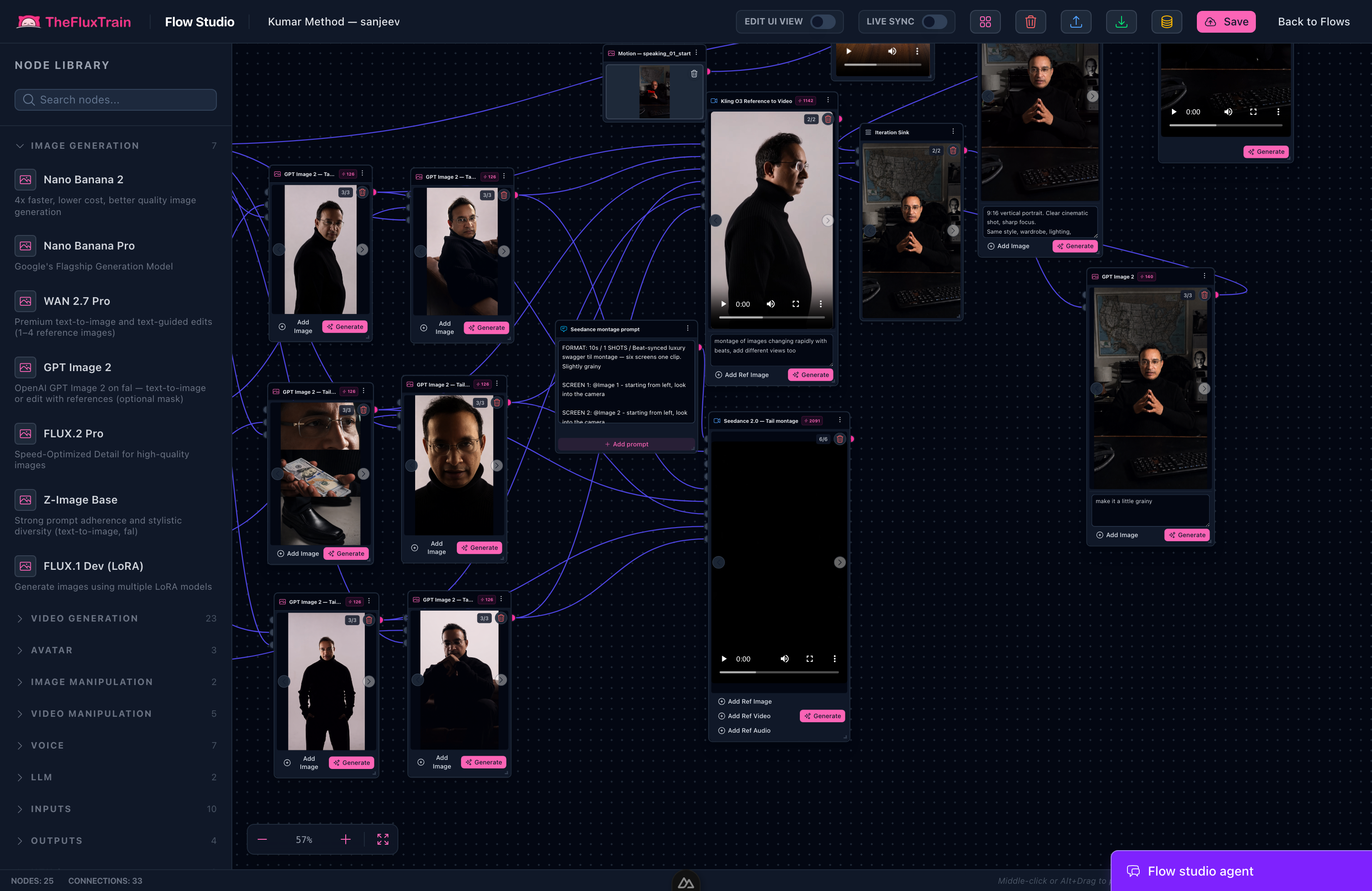
Save a base flow, clone it per film, and let the in-browser agent patch only the scenes that failed review.
Before you sign off, the agent applies a dailies mindset. Does the framing match the storyboard? Is the character recognizable? Does lighting match adjacent scenes? Is the motion believable? Does clip length fit the beat? Weak workflows concatenate whatever generated first. Strong vibe directing treats pass one as dailies, not the premiere.
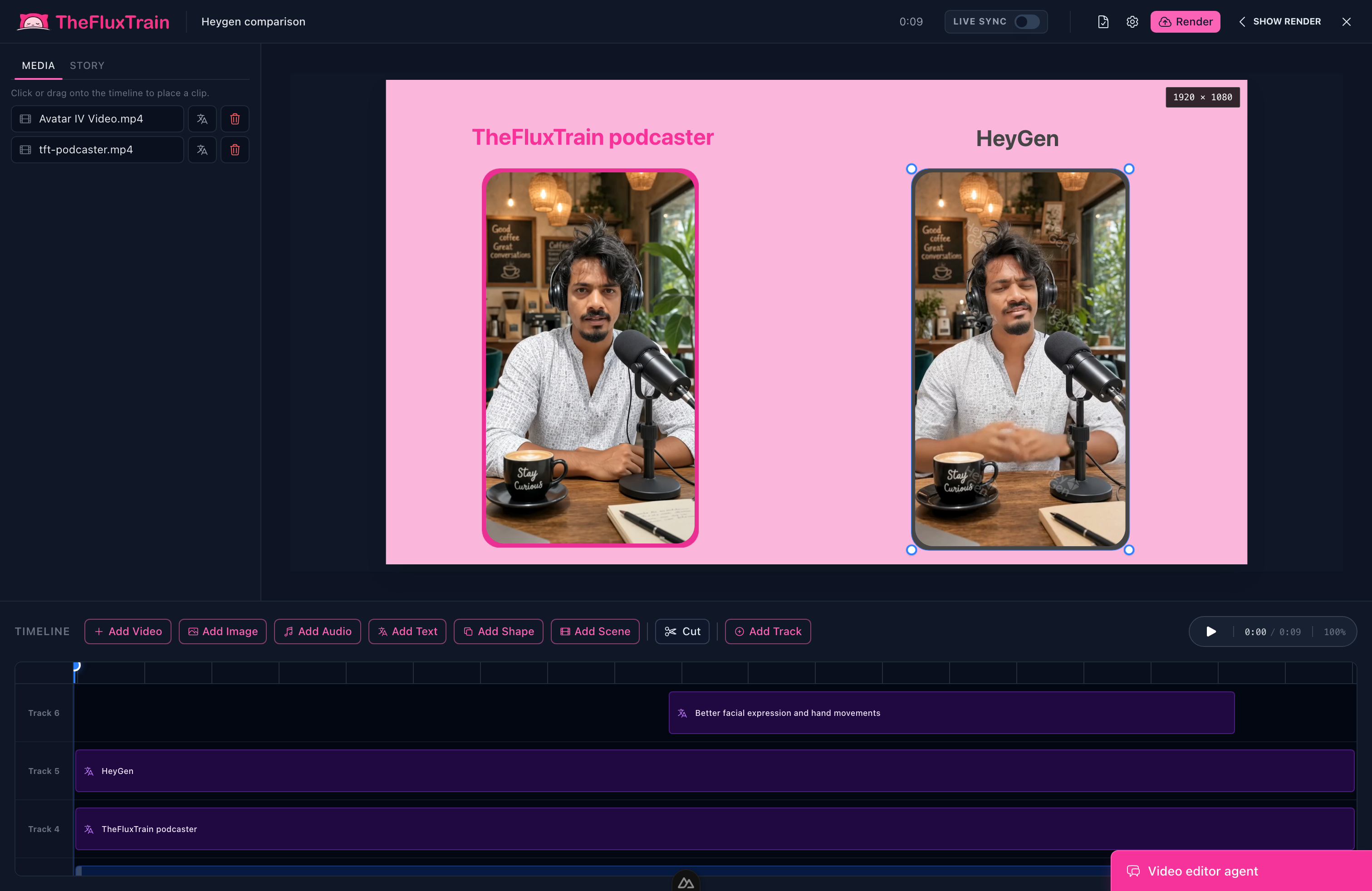
Screen the full cut on the timeline—many failures are pacing and order, not model quality.
Revising weak shots
Revision is where multi-turn conversation pays off. You do not rebuild the entire film because one shot failed. You tell the agent what to fix, and it updates the screenplay beat, the prompt, or the model settings for that scene only, then regenerates.
A multi-turn conversation example
You:
Two-minute thriller. Woman alone in inherited Victorian house, rainy evening. She finds a sealed envelope that was not there yesterday. Minimal dialogue. Tense. End with something moving in the attic.
Claude:
I will structure this in five scenes: exterior establish, interior calm, envelope discovery, letter beat, attic hook. I will generate a character sheet for "Elena, mid-30s, dark hair, grey sweater" and a location anchor for the living room. Storyboards first with GPT Image 2, then Seedance 2 image-to-video. Proceed?
You:
Yes. Keep it slow. No voice-over.
Claude:
First-pass clips are in your project folder. Scene 3 (envelope on mantel) and scene 5 (attic) are strongest. Scene 2 reads too cozy—fireplace glow feels romantic, not uneasy. Scene 4 has two lines of dialogue; your brief said minimal. I can revise 2 and 4 before assembly.
You:
Make it tenser, reduce dialogue, add a dramatic reveal.
Claude:
Updating direction:
- Scene 2: Cooler grade, single lamp, remove smile; hold on empty chair in background.
- Scene 4: Cut dialogue; silence, rain on window, slow push-in when she reads the letter.
- Dramatic reveal: Scene 5 intercuts attic door (shadow under crack) with a flash insert from the letter—a surveillance photo of her in this room, dated yesterday.
Regenerating scenes 2, 4, and 5 only. Character sheet and scenes 1 and 3 unchanged.
You:
Scene 5 is good. Scene 2 still feels too bright.
Claude:
Scene 2 v3: exposure down, desaturate greens, rain streaks on window behind her. No other scenes touched.
You never wrote "negative prompt: cheerful lighting." You stated creative intent; the agent translated it across screenplay, generation settings, and selective reruns.
Weak vs. strong creative direction
The gap between an amateur AI clip and a short film you would show someone is usually not the model. It is direction.
Weak creative direction
- One mega-prompt: "Cinematic thriller in a haunted house with plot twist."
- No scene list; hope the model invents structure.
- Different character description every generation.
- Accept the first output because regeneration costs credits.
- Revision notes like "make it better" or "more cinematic."
- No visual identity locked—every shot defaults to the same glossy template.
Result: A montage of unrelated shots—rain, a random hallway, a morphing face, a door. Technically video. Not a film.
Strong creative direction
- ChatGPT styling narrative, then brief with tone, length, character count, and ending image.
- Explicit scene beats with one job each.
- Locked references before motion; GPT Image 2 boards before Seedance 2 clips.
- Base Flow Studio flow cloned per project; in-browser agent patches per film.
- Dailies mindset: review against the brief; full-cut screening before export.
- Revision notes that name what changes narratively and visually—tension, dialogue density, reveal timing.
Result: Scene 2's cozy lamp becomes uneasy. Scene 4's chatter becomes silence. Scene 5's static door becomes a surveillance-photo reveal. The audience feels escalation because you directed escalation, even if you never touched a timeline tool yourself.
The agent executes well once intent is clear. It cannot read your mind when the brief is "something spooky." Strong direction is specific enough to argue with—which is exactly what you want when you say "make it tenser."
Try it yourself
You do not need a studio. You need taste, a brief, a conversation, and a place where the agent can run the workflow—not just describe it.
Start in ChatGPT with mood and visual language. Open TheFluxTrain, start with a template or a Flow Studio graph, and give your agent a short thriller brief like the one above. Approve the character sheet. Watch the first assembly on the timeline. Then send one revision note that names tension, dialogue, and reveal—not "make it better."
That loop—brief, structure, generate, review, revise—is how an agent directs an entire film. The first pass teaches you the story. The second pass makes it yours.
For the category overview, return to What Is Vibe Video?. For the full beginner workflow, follow the Claude or Cursor tutorial. For the bigger shift in how creators work, read Vibe Directing Is the Next Vibe Coding.