
Tutorials
Luxury-looking product ads that match your photo | TheFluxTrain

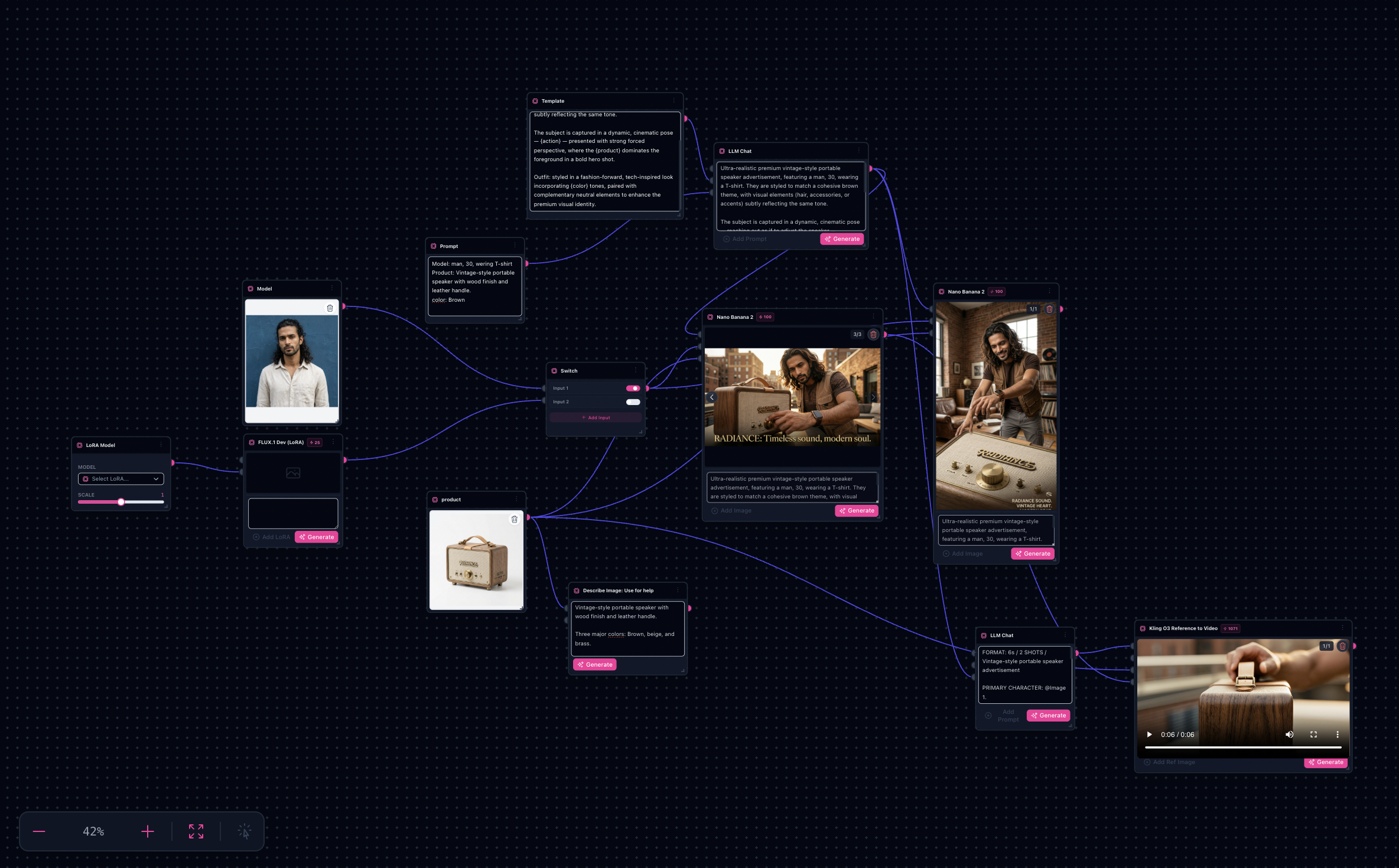
This tutorial tracks the Chromatic Power: Premium Product row from flow_templates: SKU truth + muse choreography + disciplined color grading. Operational entry point stays the AI Product Ad generator.
Note: Reference describe + Nano passes each bill separately—assume four to nine minutes baseline plus iterative sink reviews.
Try it: Open the AI Product Ad workflow · Chromatic Power: Premium Product in Explore
Deeper playbook: /blog/product-ad-creatives-reusable-workflow
Reference collage from the Chromatic defaults


(Additional defaults ytj3r6e, l2grp3q, v1nvwkb inherit the same job—surface them whenever you need tertiary props.)
What you’ll need
- Packshot-grade SKU photos lit consistently with your muse reference.
- Casting verbs—“shoulder carry”, “finger trace along seam”.
- Color thesis—“matte cobalt + warmed skin” beats “nice blue”.
- Optional microcopy snippets destined for overlays (still vet legally offline).
The workflow spine (parsed)
Input SKU + muse refs → templated prompt assemblies → Nano hero → Describe Image tightening → LLM Chat expansion → rerun Nano.
Step-by-step
- Open /ai-product-ad-generator or Chromatic Power: Premium Product in Explore.
- Swap both image inputs: muse plate + SKU plate exactly as referenced downstream.
- Edit assembler prompts: product descriptor block + muse stats block—the graph treats them independently for easier diffing across SKUs.
- Describe product (
llm-describe-image): keep it ruthless—single paragraph facts (material, finish silhouette). - LLM Chat: convert summary into cinematographer language (light direction, wardrobe harmony with SKU finish).
- Generate hero: run Nano Banana; inspect sinks for SKU dominance vs muse storytelling.
- Aspect rerun: duplicate node settings for
9:16,4:5, etc., swapping only framing verbs. - Optional Seedance: once an approved still exists, reuse references for clips (see /blog/product-ad-creatives-reusable-workflow).
Do not promise
- Conversion lift metrics or guaranteed likeness—you still clear talent releases and trademarks externally.
Next step
Open the AI Product Ad workflow · Chromatic Power: Premium Product in Explore