
Tutorials
Soft scrapbook-style portraits with cute pastel accents | TheFluxTrain

Note: Credits scale with Nano Banana batches and LoRA hops—assume five to fifteen wall-clock minutes on a first exploratory run plus replays until the collage feels cohesive.
Many family photos deserve more than a filter: tiny “mini-me” dolls, handwritten doodles, and soft paper textures can read sentimental without redrawn likeness. In Flow Studio, you keep the truth of the portrait inside reference nodes while the graph applies the dreamy scrapbook story on top—then you rerun only the knobs that drifted.
Try it: Open Children's Sketchbook generator · Pastel Persona Scrapbook in Explore (the shipped JSON internally titles Pastel Persona Scrapbook—either route works.)
Related baseline: /tutorials/children-sketchbook-coloring-pages-workflow covers printable line art; this tutorial is for the illustrative scrapbook enrichment path.
Reference plates bundled with the template row


What you’ll need
- Hero photo — clear subject isolation helps chibi overlays land convincingly.
- Texture inspiration — washi tapes, scribbles, handwriting samples (optional uploads if your graph exposes extra slots).
- House rules — e.g., “Preserve background architecture” versus “Flatten to vignette”; write them beside the prompting node before running.
The workflow in one sentence
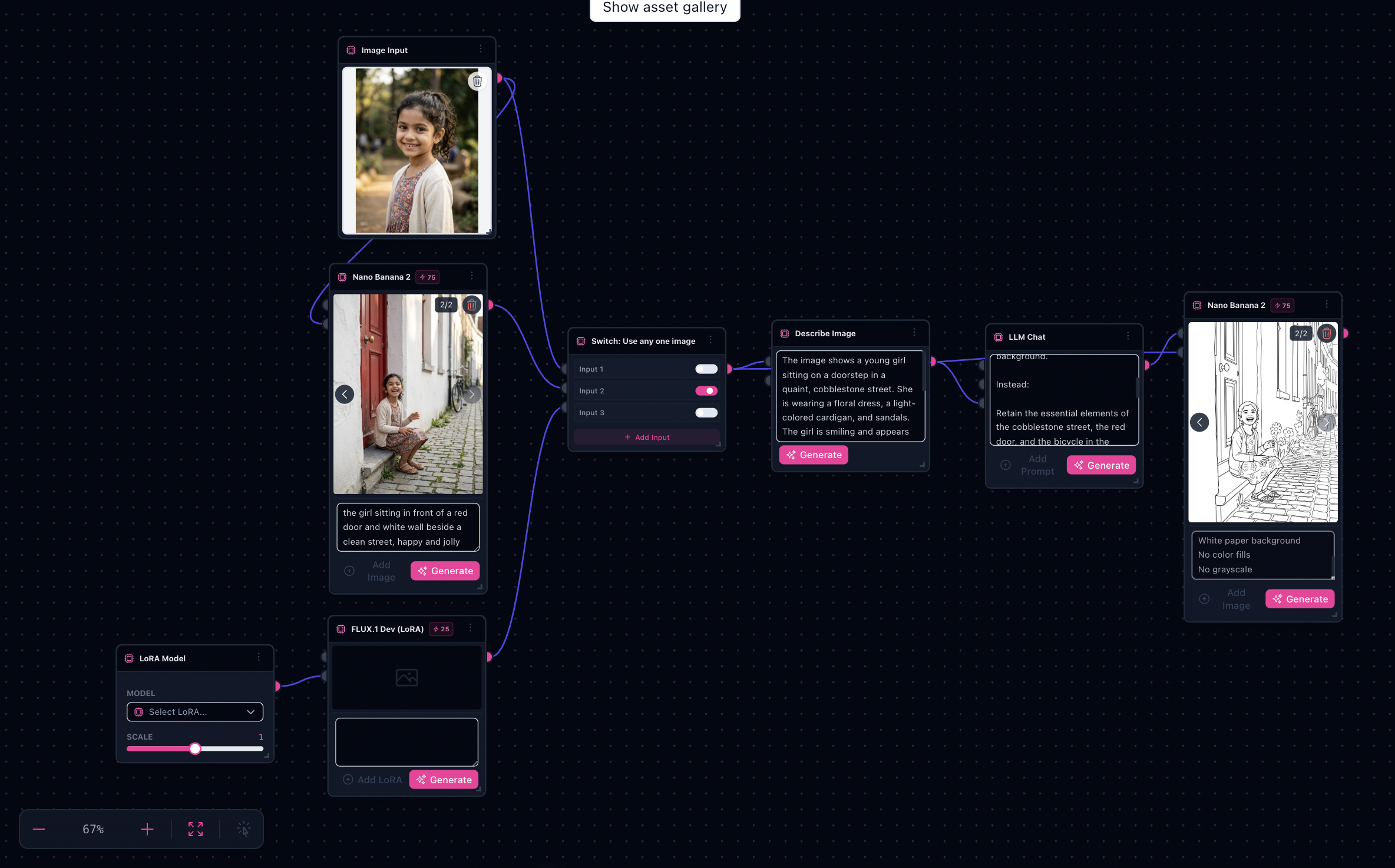
Image reference in → enrichment Nano pass (plus optional Flux LoRA detour controlled by switches) → terminal Nano refinement into sinks.
Step-by-step
- Open the scaffold — From Children's Sketchbook generator or Pastel Persona Scrapbook in Explore—same enrichment branches around Nano Banana blocks.
- Replace the wired plate — Drop your photo into labeled Input image nodes feeding the enrichment chain.
- Read prompts literally — The default system copy keeps identity and lighting; annotate only deltas (“add two kawaii dolls bottom-left”, “muted lavender wash”).
- Route LoRA thoughtfully — If
flux-dev-loraparticipates, enable it only once the untouched reference pass looks acceptable—LoRA amplify mistakes fast. - Flip
utils-switchintentionally — Use switches to audition alternate references or prompt forks without rewiring downstream nodes. - Run terminal Nano Banana — Inspect sinks for collage density; stop when annotations remain legible rather than muddy.
- Export variants — Duplicate the Flow tab, tweak doodle saturation or palette verbs, rerun only the offending segment.
Limitations & consent
- Minors: never publish likenesses without guardian consent—even if outputs look illustrated.
- Print: CMYK proofs still belong in your print vendor pipeline.
- Detail creep: overcrowded doodles distract—iterate with “single focal scribble zone” cues.
Next step
Open Children's Sketchbook generator · Pastel Persona Scrapbook in Explore