
Tutorials
Playful doodle-cartoon art from an everyday photo | TheFluxTrain

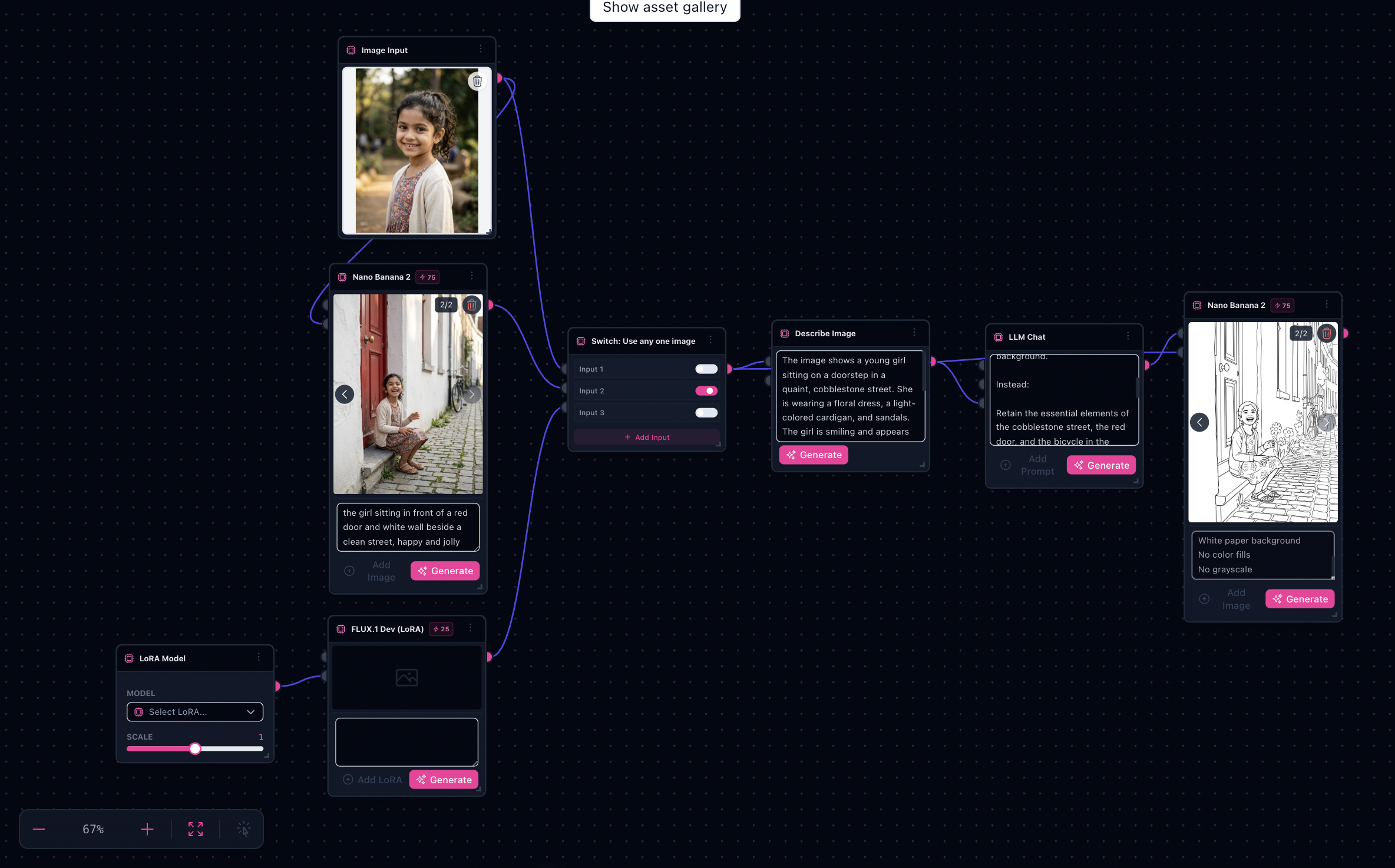
Note: This graph mirrors the pastel scrapbook family—expect paired Nano Banana stages plus toggled LoRA detours; budget similar credit usage as the sibling tutorial (AI pastel scrapbook photo tutorial).
Whimsical Doodle Dreamscape is the louder cousin: bolder outlines, handwritten annotations as first-class decoration, pastel fog over the backdrop. Pair it with Children's Sketchbook onboarding so readers always have a stable landing URL even when the Flow Template picker shows a fancier catalog title.
Try it: Open Children's Sketchbook generator · Whimsical Doodle Dreamscape in Explore
Related baseline: /tutorials/flow-studio-ai-pastel-scrapbook-photo-tutorial • /tutorials/children-sketchbook-coloring-pages-workflow
Proof plates mined from bundled defaults


What you’ll need
- High-res photo with breathing room—doodles need negative space.
- Handwriting brief (“upper-right corner thank-you scribble”).
- Optional accent palette cues—“cotton candy teal + lemonade yellow”, not vague “pastel”.
- Familiarity with switch nodes auditioning prompts without forked graphs.
The workflow in one sentence
Analyze & retain likeness → whimsical Nano transformation → routed LoRA / switch experiments → refining Nano sinks.
Step-by-step
- Launch from Children's Sketchbook generator or Whimsical Doodle Dreamscape in Explore—same enrichment graph family.
- Paste your analysis instructions on the upstream Nano node—keep likeness locked before doodles amplify.
- Edit the downstream whimsical prompt (“interactive sticker burst”, “bubble-letter captions”).
- Toggle Flux LoRA sparingly—it shifts line weight globally.
- Use utils-switch to compare alternate handwritten overlays or palettes.
- Run the finishing Nano Banana; compare sink tiles for readability.
- Duplicate the tab to explore seasonal palettes while leaving structure intact.
Limitations
- Fine lettering may blur—export large, then sharpen in vectors if needed for print.
- Overlapping handwriting + tiny faces muddy fast—solve with “limit to two annotation zones”.
- Respect privacy for minors; treat outputs as illustrative, not forensic portraits.
Next step
Open Children's Sketchbook generator · Whimsical Doodle Dreamscape in Explore