
Tutorials
Tutorial·
Polished product posters from one photo | TheFluxTrain
For shop owners and marketers who want ad-style posters without a studio day. Add your product image in Flow Studio, adjust the layout and headline space, and compare versions until one is ready to publish.

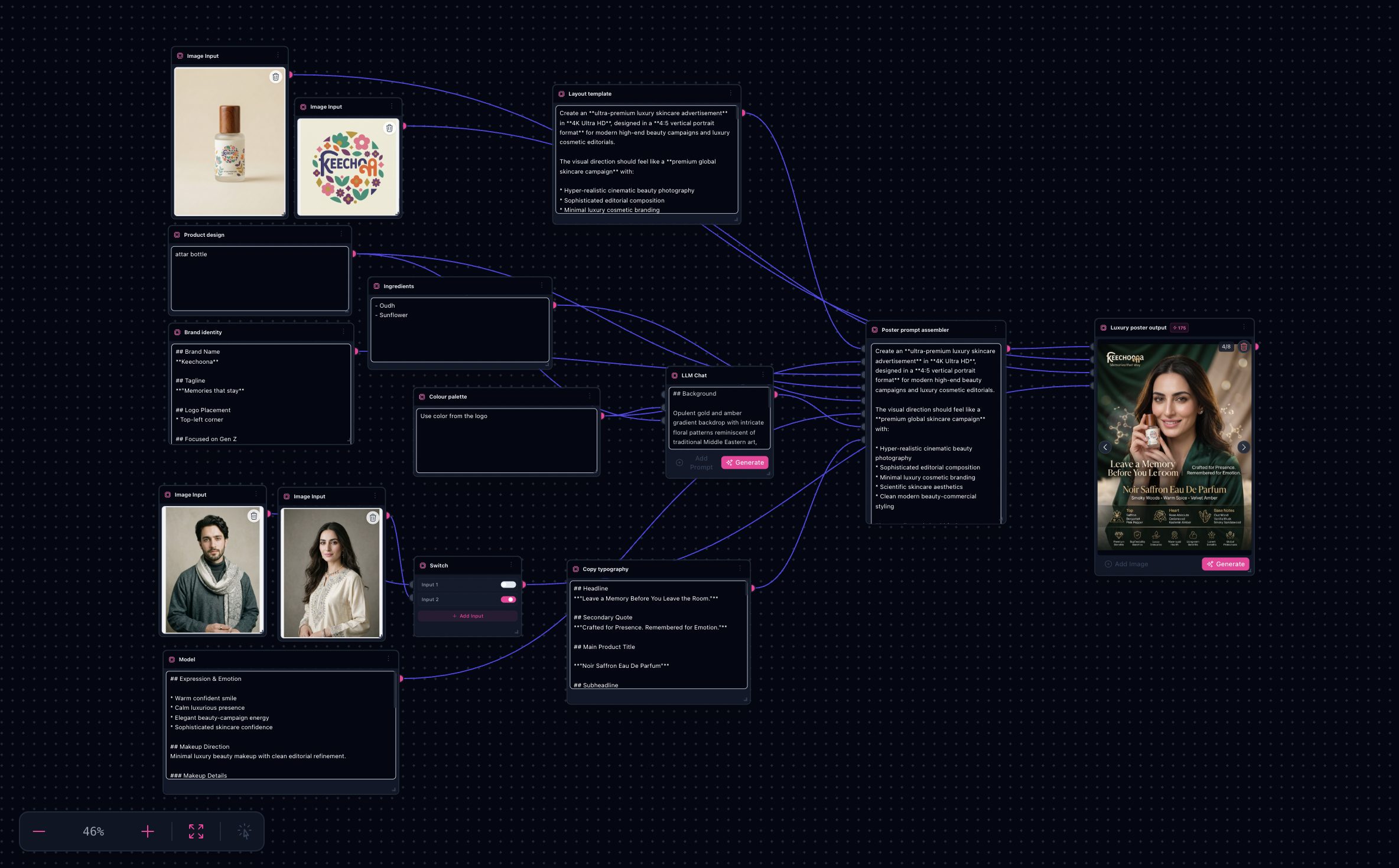
Matches the shipped Product poster generation template: modular fields feed one poster assembler, references anchor SKU truth, sinks capture layout explorations.
Note: High-resolution poster passes use more credits—budget exploration sinks plus any external print prep.
Try it: Open the Product Poster workflow
Proof strip (landing before → after)


What you’ll need
- Hero product photography — clean silhouette and readable labels.
- Brand snippets — name, tagline cues, logo placement preferences.
- Typography copy blocks — headline and claims (legally vetted outside the model).
- Optional ingredient story beats or talent direction if your layout includes them.
The workflow in one sentence
Fill poster assembler slots → optionally draft environment prose with LLM assist → route references through switches → run the hero poster node → pick from sinks.
Inside Flow Studio
The graph merges a poster prompt template with modular fields (palette, brand, product, ingredients, model, environment, copy layout), routes multiple reference images via switches, and generates Luxury poster output into sinks.
Sample outputs (full landing gallery)


Poster explorations from the bundled template—same graph, different sinks and prompts.
Step-by-step
- Open the workflow — Product poster generation → Flow Studio.
- Load references — Replace placeholder images on wired input image nodes (packshots, logos, plates).
- Pick active references — Use switch nodes when you have alternate crops feeding the generator.
- Edit modular fields — Update palette, brand identity, product, ingredients, model notes, and typography blocks feeding the assembler.
- Optional environment assist — Run the LLM chat helper to draft background or atmosphere prose from your product cue; merge into the environment slot if useful.
- Generate — Run the poster image node and compare sinks for legibility and SKU fidelity.
- Export — Lock winners, handle print trims outside Flow Studio if needed, duplicate the tab for the next seasonal drop.
Why this works
- Scaffolded luxury styling — lighting and hierarchy stay encoded in the template.
- Reference-grounded SKUs — plates steer silhouette and packaging detail.
- Separated levers — assembler vs optional LLM vs final render are easy to debug.
Poster-specific tweaks
- Legibility zones — tell the layout where headline stacks vs busy imagery.
- Palette discipline — fewer dominant colors often read more premium.
- Match aspect early — generate close to your hero placement ratio before print handoff.
Limitations
- Fine typography may still need a designer pass.
- Regulatory copy remains your responsibility.
- CMYK, spot inks, and die lines sit outside this graph.