
Tutorials
Turn talking points into shareable infographic panels | TheFluxTrain

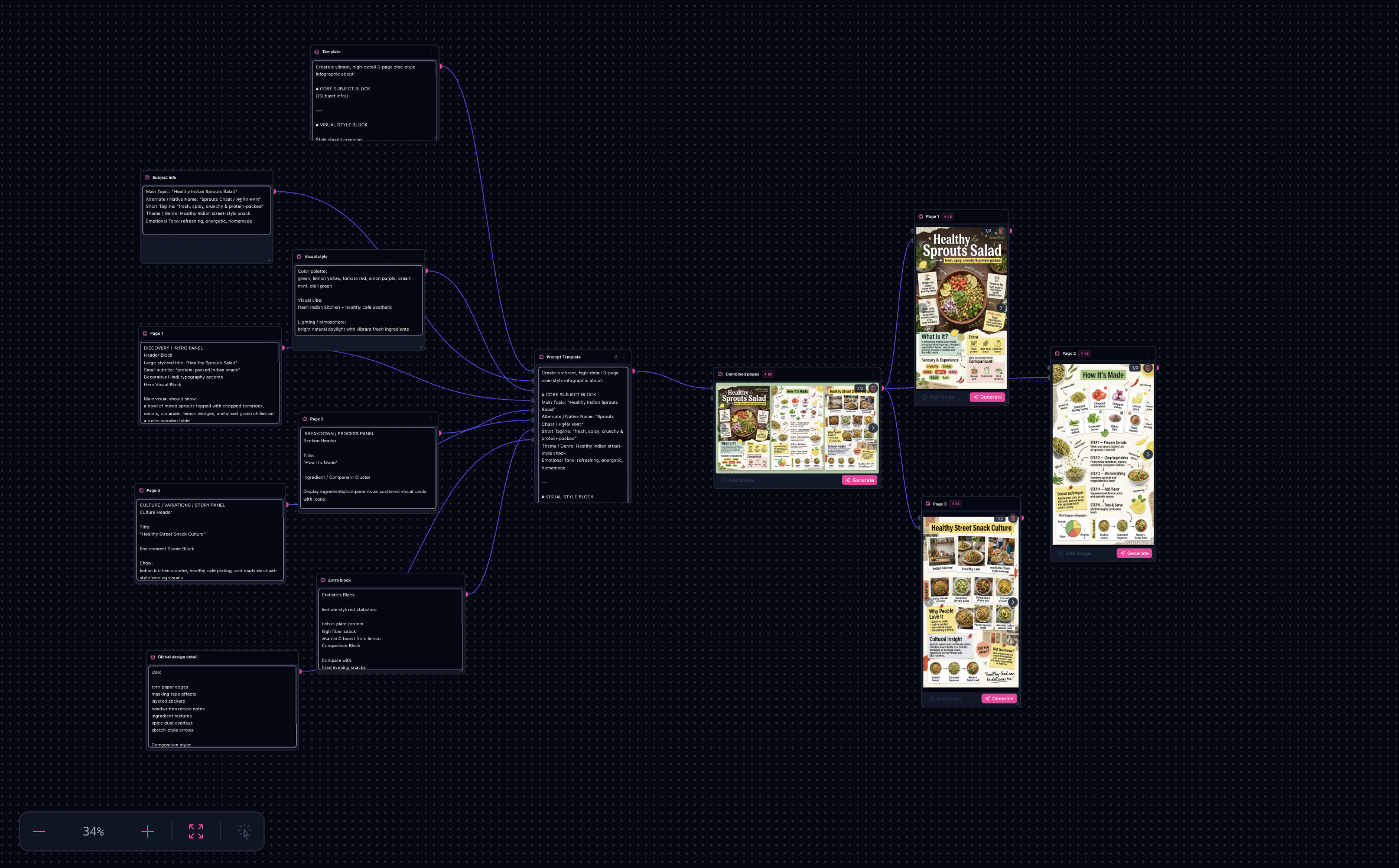
This walkthrough matches the shipped AI Infographics generator template: structured brief blocks assemble one wide master, then branches isolate individual panels.
Note: Runs consume credits and time depending on resolution and how many branches you execute—plan for a few iterations on your first campaign.
If you have ever rewritten the same infographic mega-prompt because panel two drifted from panel one, a graph-first workflow helps: one assembled prompt for the master, then separate extraction passes for each page.
Try it: Open the Infographics workflow
Proof strip and sample outputs
Same four frames as the AI Infographics generator proof gallery (outputGallery in the site constants)—template outputs, not generic fashion placeholders.
Landing gallery — layout explorations


What you’ll need
- Topic and audience — who must understand what in about thirty seconds.
- Three panel outlines — intro, process, culture (or your own three-act arc).
- Palette and style cues — editorial vs collage vs doodle; lighting mood.
- Optional logo or reference frames if you extend inputs beyond the default text-first path.
The workflow in one sentence
Fill labeled brief chunks → generate the combined master spread → run Page 1–3 extraction branches → pick winners from sinks.
Inside Flow Studio
The template wires a prompt assembler (subject, visual style, three page bodies, extras, global design, spacing) into a combined spread node, then parallel branches that isolate each panel at a dedicated aspect ratio.
Sample outputs (landing gallery)
Step-by-step
- Open the workflow — From AI Infographics generator, open the template in Flow Studio.
- Replace brief blocks — Edit inputs feeding the prompt template: subject, visual style, page 1–3 content, extra blocks, global design detail, spacing notes.
- Generate the combined master — Run the Combined pages step first; fix hierarchy and readability at the wide ratio before cropping.
- Extract panels — Run Page 1, Page 2, and Page 3 branches against the master reference; treat them as layout-preserving isolations, not brand-new art direction.
- Ship variations — Duplicate tabs or tweak only the blocks that should change (palette, stats refresh, localization) while keeping the scaffold intact.
Why this beats one mega-prompt
- Campaign coherence — one scaffold drives the master before you fragment into crops.
- Modular edits — change page two without rewriting page one inside a sticky paragraph.
- Clear iteration points — you know whether to fix the master or an extraction branch.
Layout tips
- One headline idea per panel — avoid three competing heroes in one column.
- Typography cues in the brief — handwritten vs clean sans steadies collage-heavy styles.
- Fact-check everything — models do not verify statistics or regulated claims for you.
Limitations
- Numeric and medical claims need human verification.
- Tiny type may need designer redraw for print.
- Mixed-language typography can look plausible but wrong—have a native reader review.
Next step
Open the Infographics workflow and run your real brief once.